Upgrade PMM Server HA Cluster on Kubernetes
Upgrade a PMM Server High Availability (HA) Cluster deployed with the percona/pmm-ha chart when you want to move to a new PMM release.
Requires PMM 3.10.0 and percona/pmm-ha chart 1.8.0 or later
In-place Helm upgrades for HA clusters are not supported on earlier versions. If you’re running an earlier version, you cannot use this procedure.
How PMM HA Helm upgrades work
The upgrade restarts each of the three PMM Server pods one at a time, waiting for each to become ready before restarting the next. HAProxy, PostgreSQL, VictoriaMetrics, ClickHouse, and the operators are not restarted and remain running throughout.
If this PMM release updated operator versions, make sure to first upgrade the operators.
Traffic flows only to the active leader pod. When that pod restarts, your PMM dashboards, alerts, and metric collection are briefly unavailable until a new leader takes over. This typically takes around 5-10 seconds per pod and resolves on its own.
Prerequisites
To avoid losing data or a long outage, follow these steps before you upgrade:
-
Check that your cluster runs Kubernetes 1.32 or later and that you use Helm 3.17.0 or later. The PMM 3.10.0 chart doesn’t install on earlier versions:
kubectl version helm version -
Check that all three PMM Server pods are running and ready. The upgrade restarts the pods one at a time, so if one is already down, PMM becomes unreachable while the next one restarts:
kubectl get pods -n <namespace> -l app.kubernetes.io/component=pmm-server -
Back up your PMM HA Cluster before upgrading. Downgrades are not supported, so a backup is your only recovery option. If the upgrade fails, restore the backup.
-
Check whether this PMM release updated operator versions. Compare the operator versions in the supported platforms table for your current and target chart versions. If they differ, complete Upgrade the operators before running
helm upgrade pmm-ha. -
Keep all custom settings in your
values.yamlfile. Settings applied withkubectl patchare silently reset on every upgrade.
Upgrade the operators
Each PMM HA database (VictoriaMetrics, ClickHouse, and PostgreSQL) is managed by a Kubernetes operator that handles its lifecycle: scaling, failover, and version upgrades. These operators run as a separate Helm release (pmm-operators) installed from the pmm-ha-dependencies chart — helm upgrade pmm-ha does not touch them. Run these steps only if the operator versions in the supported platforms table differ between your current and target chart versions.
To upgrade the operators:
-
Find the release name of your operators installation, usually
pmm-operators:helm list --namespace <namespace> -
Upgrade it:
helm upgrade pmm-operators percona/pmm-ha-dependencies --namespace <namespace> -
Wait for the new operator pods to roll out:
kubectl rollout status deployment -l app.kubernetes.io/name=pg-operator -n <namespace> --timeout=300s
kubectl rollout status deployment -l app.kubernetes.io/name=altinity-clickhouse-operator -n <namespace> --timeout=300s
kubectl rollout status deployment -l app.kubernetes.io/name=victoria-metrics-operator -n <namespace> --timeout=300s
Upgrading the operators does not restart or change the database clusters they manage. The databases keep running under the new operator version automatically.
PostgreSQL operator major version upgrades
If the pmm-ha-dependencies chart bumps the Percona Operator for PostgreSQL to a new major version (for example, 2.x to 3.0.0), review the operator upgrade notes before upgrading. Major operator versions can include CRD changes that require manual steps.
Upgrade PMM HA Cluster
Once you’ve completed the steps in Prerequisites, run the upgrade:
-
Update the Helm repository:
helm repo update percona -
Find the chart version that ships the target PMM version. The APP VERSION column shows the PMM version:
helm search repo percona/pmm-ha --versions -
Run the upgrade, replacing
<chart-version>with the chart version from the previous step and<version>with the target PMM version. Without--version, Helm installs the newest chart in the repository. Use--reset-then-reuse-valuesto keep your existing configuration and pick up the new chart’s defaults, or-f values.yamlif you manage settings in a values file:helm upgrade pmm-ha percona/pmm-ha \ --namespace pmm \ --version <chart-version> \ --reset-then-reuse-values \ --set image.tag=<version>If this fails with
Job.batch "<release>-pmm-token-init" is invalid: spec.template: ... field is immutable, see Troubleshoot upgrade issues. -
Track the rollout progress. Expect a brief interruption when the leader pod restarts:
kubectl rollout status statefulset/pmm-ha -n pmm -
Confirm all three pods are running the new version:
kubectl get pods -l app.kubernetes.io/name=pmm -n pmm -o jsonpath='{range .items[*]}{.metadata.name}{"\t"}{.status.containerStatuses[0].image}{"\n"}{end}' -
Confirm PMM Server is reachable and returning the new version:
curl -k https://<pmm-ha-haproxy-endpoint>/v1/server/version -
Check the PMM Server logs on each pod for errors. PMM Server writes them to files under
/srv/logs/, sokubectl logsdoesn’t show them:for p in pmm-ha-0 pmm-ha-1 pmm-ha-2; do echo "--- $p" kubectl exec -n pmm "$p" -c pmm-ha -- tail -50 /srv/logs/pmm-managed.log done
Built-in alert rules during the upgrade
The nodes are upgraded one at a time, so for a short while they run different PMM versions. If the new version changes a built-in alert rule, the rule switches back and forth between its old and new settings until every node runs the new version. You don’t need to do anything. The switching stops on its own.
Confirm the cluster is healthy
After the upgrade, verify that the cluster is healthy and that a leader is active:
-
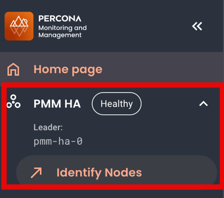
Check that the PMM HA badge in the side menu shows Healthy.
-
Go to PMM HA > Identify Nodes and check that one PMM Server node has the Leader badge next to its name. For details, see Check HA roles in Inventory.
-
Go to PMM HA > Overview and check that all component panels in the Overview section are green on the PMM HA Health Overview dashboard.
If you cannot log in after upgrading, see Cannot log in with the admin password.
Upgrade the underlying databases
Upgrading the operators does not change the database versions. Only upgrade a database when you have a specific reason, such as a version deadline or a required feature.
If you need to upgrade one:
| Database | Downtime | Instructions | Planning notes |
|---|---|---|---|
| PostgreSQL | Yes for major versions (full cluster stop); no for minor versions | Major version upgrade, minor version upgrade | Cannot be reversed. Plan as a separate maintenance window and take a full backup first. |
| ClickHouse | No, rolls one instance at a time | Update the ClickHouse version | |
| VictoriaMetrics | No | Operator configuration | Do not remove victoriaMetrics.version from your values. The operator falls back to a built-in default if not set, so an operator upgrade can silently change the version. |
Roll back to a previous version
If the upgrade causes issues, you can restore your previous Helm configuration. Keep in mind that this only restores the PMM Server configuration, not any database changes PMM made during the upgrade.
To fully return to the pre-upgrade state, roll back the Helm release first, then restore the backup you took in Prerequisites. A backup can only be restored into the same PMM version it was taken from.
To roll back the Helm release to the previous version:
-
List available revisions:
helm history pmm-ha -n pmm -
Roll back to the revision before the upgrade:
helm rollback pmm-ha <revision-number> -n pmm