Upgrade Database and Operator on OpenShift
Upgrading database and Operator on Red Hat Marketplace or to upgrade Red Hat certified Operators on OpenShift generally follows the standard upgrade scenario, but includes a number of special steps specific for these platforms.
Considerations for using OpenShift 4.19
Starting with OpenShift 4.19, the way images with not fully qualified names are pulled has changed for repositories that share the same repository name on DockerHub and Red Hat Marketplace. By default the tags are pulled from Red Hat Marketplace. Specifying not fully qualified image names may result in the ImagePullBackOff error.
- OLM installation: Images are provided with the fully qualified names and are pulled from the Red Hat Marketplace/Dockerhub registry.
- Manual install/update with default manifests: Images must use the
docker.ioregistry prefix to guarantee successful download from the Dockerhubpercona-xtradb-clusterrepository. See the Update via the command-line interface section for the exact steps.
Upgrading the Operator and CRD
You can actually update the Operator via the Operator Lifecycle Manager (OLM) web interface.
Login to your OLM installation and list installed Operators for your Namespace to see if there are upgradable items:
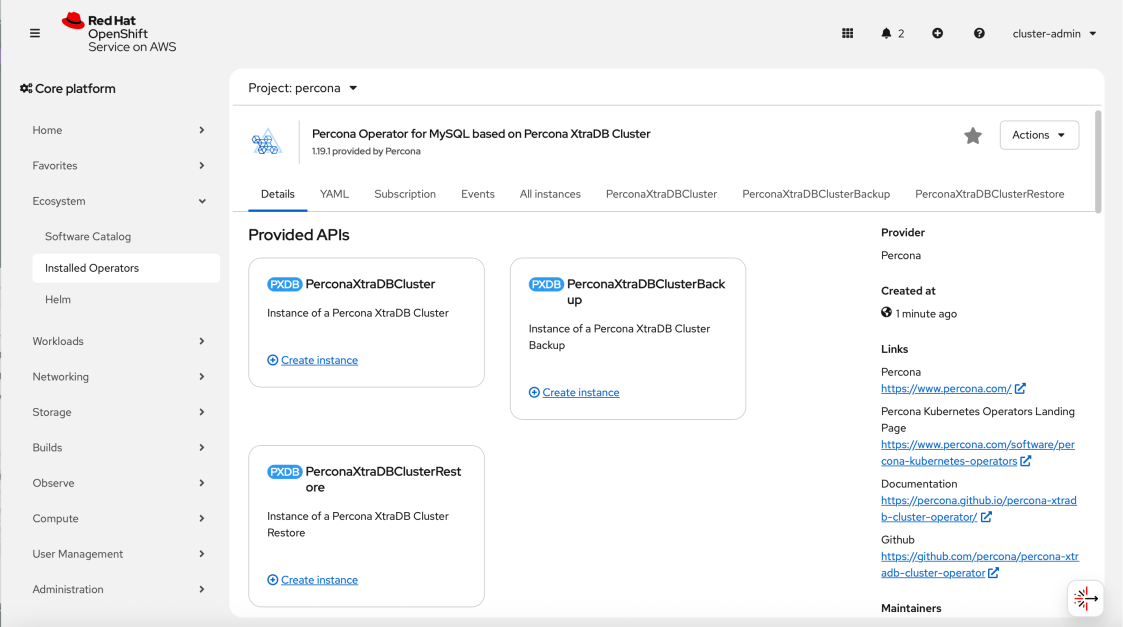
Click the “Upgrade available” link to see upgrade details, then click “Preview InstallPlan” button, and finally “Approve” to upgrade the Operator.
-
First of all you need to manually update
initContainer.imageCustom Resource option with the value of an alternative initial Operator installation image. You need doing this for all database clusters managed by the Operator. Without this step the cluster will go into error state after the Operator upgrade.-
Find the initial Operator installation image with
kubectl get deploycommand:kubectl get deploy percona-xtradb-cluster-operator -o yamlExpected output
... "initContainer" : { "image": "registry.connect.redhat.com/percona/percona-xtradb-cluster-operator@sha256:4edb5a53230e023bbe54c8e9e1154579668423fc3466415d5b04b8304a8e01d7" }, ... -
Apply a patch to update the
initContainer.imageoption of your cluster Custom Resource with this value. Supposing that your cluster name iscluster1, the command should look as follows:kubectl patch pxc cluster1 --type=merge --patch '{ "spec": { "initContainer": { "image": "registry.connect.redhat.com/percona/percona-xtradb-cluster-operator@sha256:4edb5a53230e023bbe54c8e9e1154579668423fc3466415d5b04b8304a8e01d7" } }}'
-
-
Now you can actually update the Operator via the Operator Lifecycle Manager (OLM) web interface.
Login to your OLM installation and list installed Operators for your Namespace to see if there are upgradable items:
Click the “Upgrade available” link to see upgrade details, then click “Preview InstallPlan” button, and finally “Approve” to upgrade the Operator.
-
First of all you need to manually update
initImageCustom Resource option with the value of an alternative initial Operator installation image. You need doing this for all database clusters managed by the Operator. Without this step the cluster will go into error state after the Operator upgrade.-
Find the initial Operator installation image with
kubectl get deploycommand:kubectl get deploy percona-xtradb-cluster-operator -o yamlExpected output
... "initContainer" : { "image": "registry.connect.redhat.com/percona/percona-xtradb-cluster-operator@sha256:4edb5a53230e023bbe54c8e9e1154579668423fc3466415d5b04b8304a8e01d7" }, ... -
Apply a patch to update the
initImageoption of your cluster Custom Resource with this value. Supposing that your cluster name iscluster1, the command should look as follows:kubectl patch pxc cluster1 --type=merge --patch '{ "spec": { "initImage":"registry.connect.redhat.com/percona/percona-xtradb-cluster-operator@sha256:4edb5a53230e023bbe54c8e9e1154579668423fc3466415d5b04b8304a8e01d7" }}'
-
-
Now you can actually update the Operator via the Operator Lifecycle Manager (OLM) web interface.
Login to your OLM installation and list installed Operators for your Namespace to see if there are upgradable items:
Click the “Upgrade available” link to see upgrade details, then click “Preview InstallPlan” button, and finally “Approve” to upgrade the Operator.
Update via the command-line interface
The following steps apply if you plan to use OpenShift 4.19. See the Considerations for using OpenShift 4.19.
-
Check all clusters managed by the Operator to see if
initContainer.imageis set.* If defined: skip the next step. * If undefined: proceed to step 2.-
Apply a patch to the clusters with undefined
initContainer.imageto define this image with thedocker.ioregistry in the image path:kubectl patch pxc cluster1 --type=merge --patch '{ "spec": { "initcontainer": { "image": "docker.io/percona/percona-xtradb-cluster-operator:1.17.0" } } }'
Important! This command triggers the restart of your clusters. Wait till they restart and report the Ready status
-
Update the Operator deployment and specify the
docker.ioregistry name in the image path:kubectl patch deployment percona-xtradb-cluster-operator \ -p'{"spec":{"template":{"spec":{"containers":[{"name":"percona-xtradb-cluster-operator","image":"docker.io/percona/percona-xtradb-cluster-operator:1.20.0"}]}}}}' -
Update the Custom Resource version and the database cluster. Specify the
initContainerimage with thedocker.ioregistry name in the path. Pay attention to the changed repositories for PXB and logcollector:kubectl patch pxc cluster1 --type=merge --patch '{ "spec": { "crVersion": "1.20.0", "initContainer": "docker.io/percona/percona-xtradb-cluster-operator:1.20.0", "pxc":{ "image": "docker.io/percona/percona-xtradb-cluster:8.0.45-36.1" }, "proxysql":{ "image": "docker.io/percona/proxysql2:2.7.3-1.3" }, "haproxy":{ "image": "docker.io/percona/haproxy:2.8.18-1" }, "backup":{ "image": "docker.io/percona/percona-xtrabackup:8.0.35-35.1" }, "logcollector":{ "image": "docker.io/percona/fluentbit:5.0.6" }, "pmm":{ "image": "docker.io/percona/pmm-client:2.44.1-1" } } }'
-
Upgrading Percona XtraDB Cluster
-
Make sure that
spec.updateStrategyoption in the Custom Resource is set toSmartUpdate,spec.upgradeOptions.applyoption is set toNeverorDisabled(this means that the Operator will not carry on upgrades automatically).... spec: updateStrategy: SmartUpdate upgradeOptions: apply: Disabled ... -
Find the new initial Operator installation image name (it had changed during the Operator upgrade) and other image names for the components of your cluster with the
kubectl get deploycommand:kubectl get deploy percona-xtradb-cluster-operator -o yamlExpected output
... "initContainer" : { "image": "registry.connect.redhat.com/percona/percona-xtradb-cluster-operator@sha256:e8c0237ace948653d8f3e297ec67276f23f4f7fb4f8018f97f246b65604d49e6" }, ... "pxc": { "size": 3, "image": "registry.connect.redhat.com/percona/percona-xtradb-cluster-operator-containers@sha256:b526b83865ca26808aa1ef96f64319f65deba94b76c5b5b6aa181981ebd4282f" }, ... "haproxy": { "enabled": true, "size": 3, "image": "registry.connect.redhat.com/percona/percona-xtradb-cluster-operator-containers@sha256:cbd4f1791941765eb6732f2dc88bad29bf23469898bd30f02d22a95c0f2aab9b" }, ... "proxysql": { "enabled": false, "size": 3, "image": "registry.connect.redhat.com/percona/percona-xtradb-cluster-operator-containers@sha256:24f6d959efcf2083addf42f3b816220654133dc8a5a8a989ffd4caffe122e19c" }, ... "logcollector": { "enabled": true, "image": "registry.connect.redhat.com/percona/percona-xtradb-cluster-operator-containers@sha256:cb6ccda7839b3205ffaf5cb8016d1f91ed3be4438334d2122beb38791a32c015" }, ... "pmm": { "enabled": false, "image": "registry.connect.redhat.com/percona/percona-xtradb-cluster-operator-containers@sha256:165f97cdae2b6def546b0df7f50d88d83c150578bdb9c992953ed866615016f1" }, ... "backup": { "image": "registry.connect.redhat.com/percona/percona-xtradb-cluster-operator-containers@sha256:483acaa57378ee5529479dbcabb3b8002751c1c43edd5553b52f001f323d4723" }, ... -
Apply a patch to set the necessary
crVersionvalue (equal to the Operator version) and update images in your cluster Custom Resource. Supposing that your cluster name iscluster1, the command should look as follows:kubectl patch pxc cluster1 --type=merge --patch '{ "spec": { "crVersion":"1.20.0", "initContainer": { "image": "registry.connect.redhat.com/percona/percona-xtradb-cluster-operator@sha256:e8c0237ace948653d8f3e297ec67276f23f4f7fb4f8018f97f246b65604d49e6" }, "pxc":{ "image": "registry.connect.redhat.com/percona/percona-xtradb-cluster-operator-containers@sha256:b526b83865ca26808aa1ef96f64319f65deba94b76c5b5b6aa181981ebd4282f" }, "proxysql": { "image": "registry.connect.redhat.com/percona/percona-xtradb-cluster-operator-containers@sha256:24f6d959efcf2083addf42f3b816220654133dc8a5a8a989ffd4caffe122e19c" }, "haproxy": { "image": "registry.connect.redhat.com/percona/percona-xtradb-cluster-operator-containers@sha256:cbd4f1791941765eb6732f2dc88bad29bf23469898bd30f02d22a95c0f2aab9b" }, "backup": { "image": "registry.connect.redhat.com/percona/percona-xtradb-cluster-operator-containers@sha256:483acaa57378ee5529479dbcabb3b8002751c1c43edd5553b52f001f323d4723" }, "logcollector": { "image": "percona/percona-xtradb-cluster-operator:1.20.0-logcollector-fluentbit5.0.6" }, "pmm": { "image": "registry.connect.redhat.com/percona/percona-xtradb-cluster-operator-containers@sha256:165f97cdae2b6def546b0df7f50d88d83c150578bdb9c992953ed866615016f1" } }}'kubectl patch pxc cluster1 --type=merge --patch '{ "spec": { "crVersion":"1.13.0", "initImage": "registry.connect.redhat.com/percona/percona-xtradb-cluster-operator@sha256:e8c0237ace948653d8f3e297ec67276f23f4f7fb4f8018f97f246b65604d49e6", "pxc":{ "image": "registry.connect.redhat.com/percona/percona-xtradb-cluster-operator-containers@sha256:b526b83865ca26808aa1ef96f64319f65deba94b76c5b5b6aa181981ebd4282f" }, "proxysql": { "image": "registry.connect.redhat.com/percona/percona-xtradb-cluster-operator-containers@sha256:24f6d959efcf2083addf42f3b816220654133dc8a5a8a989ffd4caffe122e19c" }, "haproxy": { "image": "registry.connect.redhat.com/percona/percona-xtradb-cluster-operator-containers@sha256:cbd4f1791941765eb6732f2dc88bad29bf23469898bd30f02d22a95c0f2aab9b" }, "backup": { "image": "registry.connect.redhat.com/percona/percona-xtradb-cluster-operator-containers@sha256:483acaa57378ee5529479dbcabb3b8002751c1c43edd5553b52f001f323d4723" }, "logcollector": { "image": "percona/percona-xtradb-cluster-operator:1.20.0-logcollector-fluentbit5.0.6" }, "pmm": { "image": "registry.connect.redhat.com/percona/percona-xtradb-cluster-operator-containers@sha256:165f97cdae2b6def546b0df7f50d88d83c150578bdb9c992953ed866615016f1" } }}'Warning
The above command upgrades various components of the cluster including PMM Client. If you didn’t follow the official recommendation to upgrade PMM Server before upgrading PMM Client, you can avoid PMM Client upgrade by removing it from the list of images as follows:
kubectl patch pxc cluster1 --type=merge --patch '{
    "spec": {
       "crVersion":"1.20.0",
       "initContainer": { "image": "registry.connect.redhat.com/percona/percona-xtradb-cluster-operator@sha256:e8c0237ace948653d8f3e297ec67276f23f4f7fb4f8018f97f246b65604d49e6" },
       "pxc":{ "image": "registry.connect.redhat.com/percona/percona-xtradb-cluster-operator-containers@sha256:b526b83865ca26808aa1ef96f64319f65deba94b76c5b5b6aa181981ebd4282f" },
       "proxysql": { "image": "registry.connect.redhat.com/percona/percona-xtradb-cluster-operator-containers@sha256:24f6d959efcf2083addf42f3b816220654133dc8a5a8a989ffd4caffe122e19c" },
       "haproxy":  { "image": "registry.connect.redhat.com/percona/percona-xtradb-cluster-operator-containers@sha256:cbd4f1791941765eb6732f2dc88bad29bf23469898bd30f02d22a95c0f2aab9b" },
       "backup":   { "image": "registry.connect.redhat.com/percona/percona-xtradb-cluster-operator-containers@sha256:483acaa57378ee5529479dbcabb3b8002751c1c43edd5553b52f001f323d4723" },
       "logcollector": { "image": "percona/percona-xtradb-cluster-operator:1.20.0-logcollector-fluentbit5.0.6" }
    }}'
kubectl patch pxc cluster1 --type=merge --patch '{ "spec": { "crVersion":"1.13.0", "initImage": "registry.connect.redhat.com/percona/percona-xtradb-cluster-operator@sha256:e8c0237ace948653d8f3e297ec67276f23f4f7fb4f8018f97f246b65604d49e6", "pxc":{ "image": "registry.connect.redhat.com/percona/percona-xtradb-cluster-operator-containers@sha256:b526b83865ca26808aa1ef96f64319f65deba94b76c5b5b6aa181981ebd4282f" }, "proxysql": { "image": "registry.connect.redhat.com/percona/percona-xtradb-cluster-operator-containers@sha256:24f6d959efcf2083addf42f3b816220654133dc8a5a8a989ffd4caffe122e19c" }, "haproxy": { "image": "registry.connect.redhat.com/percona/percona-xtradb-cluster-operator-containers@sha256:cbd4f1791941765eb6732f2dc88bad29bf23469898bd30f02d22a95c0f2aab9b" }, "backup": { "image": "registry.connect.redhat.com/percona/percona-xtradb-cluster-operator-containers@sha256:483acaa57378ee5529479dbcabb3b8002751c1c43edd5553b52f001f323d4723" }, "logcollector": { "image": "percona/percona-xtradb-cluster-operator:1.20.0-logcollector-fluentbit5.0.6" } }}' -
The deployment rollout will be automatically triggered by the applied patch. You can track the rollout process in real time with the
kubectl rollout statuscommand with the name of your cluster:$ kubectl rollout status sts cluster1-pxc
Created: October 9, 2024