Embeddings for Percona Search for MongoDB
Percona Search for MongoDB supports vector search based on embeddings that you generate and manage yourself or on automatically generated ones. You can generate embeddings for your data using an embedding model of your choice, store the resulting vectors in your MongoDB documents, and query them with the $vectorSearch aggregation stage to find documents with similar meaning.
Once an embedding is stored, it can be reused for future searches. Each search query requires its own embedding, generated from the query text using the same embedding model that was used to generate the stored document embeddings.
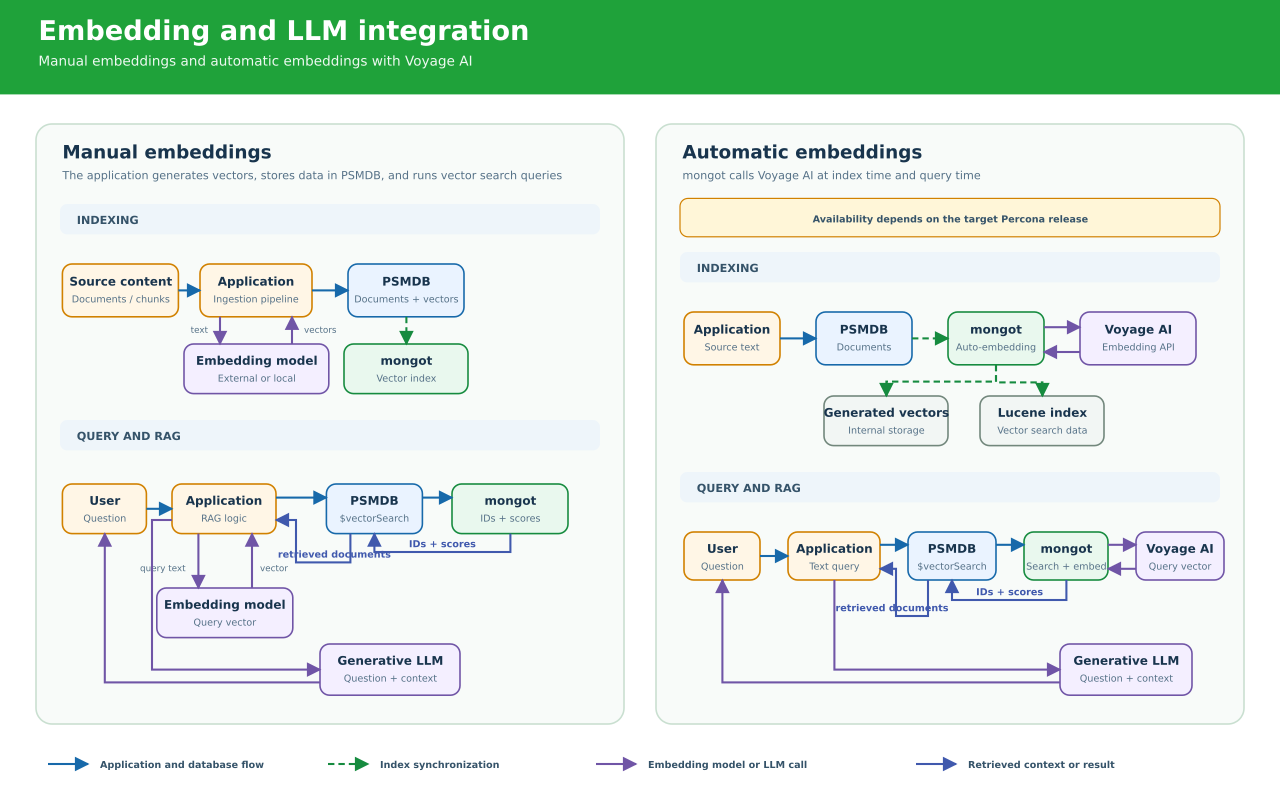
Manual embeddings
With manual embeddings, the application controls embedding generation:
-
An ingestion pipeline sends document content to an external or locally hosted embedding model.
-
The pipeline stores the generated vector in a field in the source document.
-
mongotindexes that vector field. -
At query time, the application sends the user’s query to the same embedding model.
-
The application passes the generated query vector to $
vectorSearchthrough thequeryVectoroption.
For RAG applications , the application sends the user’s question and the documents returned by vector search to a generative LLM. The LLM uses the retrieved documents as context to generate the response.
Automatic embeddings
With automatic embeddings , mongot sends the indexed text and query text to the configured embedding service (Voyage AI or an OpenAI-compatible provider). It generates document embeddings during indexing and a query embedding when the application runs a text-based vector search.