Automatic embedding configuration
With automatic embedding, mongot generates vector embeddings for you. You don’t have to build an embedding pipeline in your application. mongot embeds your documents when it indexes them, keeps the embeddings up to date as documents change, and embeds the query text when you run $vectorSearch.
Percona Search for MongoDB can send this work to hosted embedding services, such as OpenAI or the Hugging Face Inference API, or to an embedding server that you run yourself, such as Ollama. This page lists the supported providers, explains how mongot uses them, and shows the general configuration procedure.
Supported providers
Each model in the model catalog uses one of the following providers. The provider is set by the embeddingProvider field of the model’s catalog entry.
| Provider | Embedding services | Setup guide |
|---|---|---|
VOYAGE |
Voyage AI hosted models. The default catalog includes voyage-4-large, voyage-4, voyage-4-lite, and voyage-code-3. |
Configuration reference |
OPENAI_COMPATIBLE |
Any service that implements the OpenAI /v1/embeddings API: OpenAI, Azure OpenAI, Ollama, vLLM, llama.cpp, LM Studio, LocalAI, and Hugging Face Text Embeddings Inference (TEI) |
OpenAI-compatible providers |
HUGGINGFACE_INFERENCE |
The hosted Hugging Face Inference API, dedicated Hugging Face Inference Endpoints, and the native /embed route of a self-hosted TEI server |
Hugging Face Inference API |
You can configure models from several providers on the same mongot instance.
Note
Only float vector output is supported for OPENAI_COMPATIBLE and HUGGINGFACE_INFERENCE models. Scalar and binary output formats aren’t supported.
How automatic embedding works
Configuration files
Automatic embedding uses two configuration files:
- The
embeddingsection inmongot.conf. Automatic embedding turns on as soon as this section exists. It holds settings that apply to all models, such as whichmongotnode writes the embeddings, the path to the model catalog, and the Voyage AI key files. - The model catalog,
embedding-service-configs.yml. It defines each embedding model: its provider, endpoint, credentials, output dimensions, batching, prefixes, and retry behavior. The catalog is installed next to themongotbinary. You can pointmongotto your own copy withembedding.modelConfigFile.
Indexing and querying
When you create a Vector Search index with an autoEmbed field, mongot does the following:
- During the initial collection scan,
mongotsends the text of the indexed field to the embedding provider in batches and stores the returned vectors. - As documents change,
mongotreads the changes from change streams and embeds the new or updated text. - When you run
$vectorSearchwith a textquery,mongotembeds the query with the same model, adding the model’s query prefix if one is configured. Then it matches the query vector against the stored vectors.
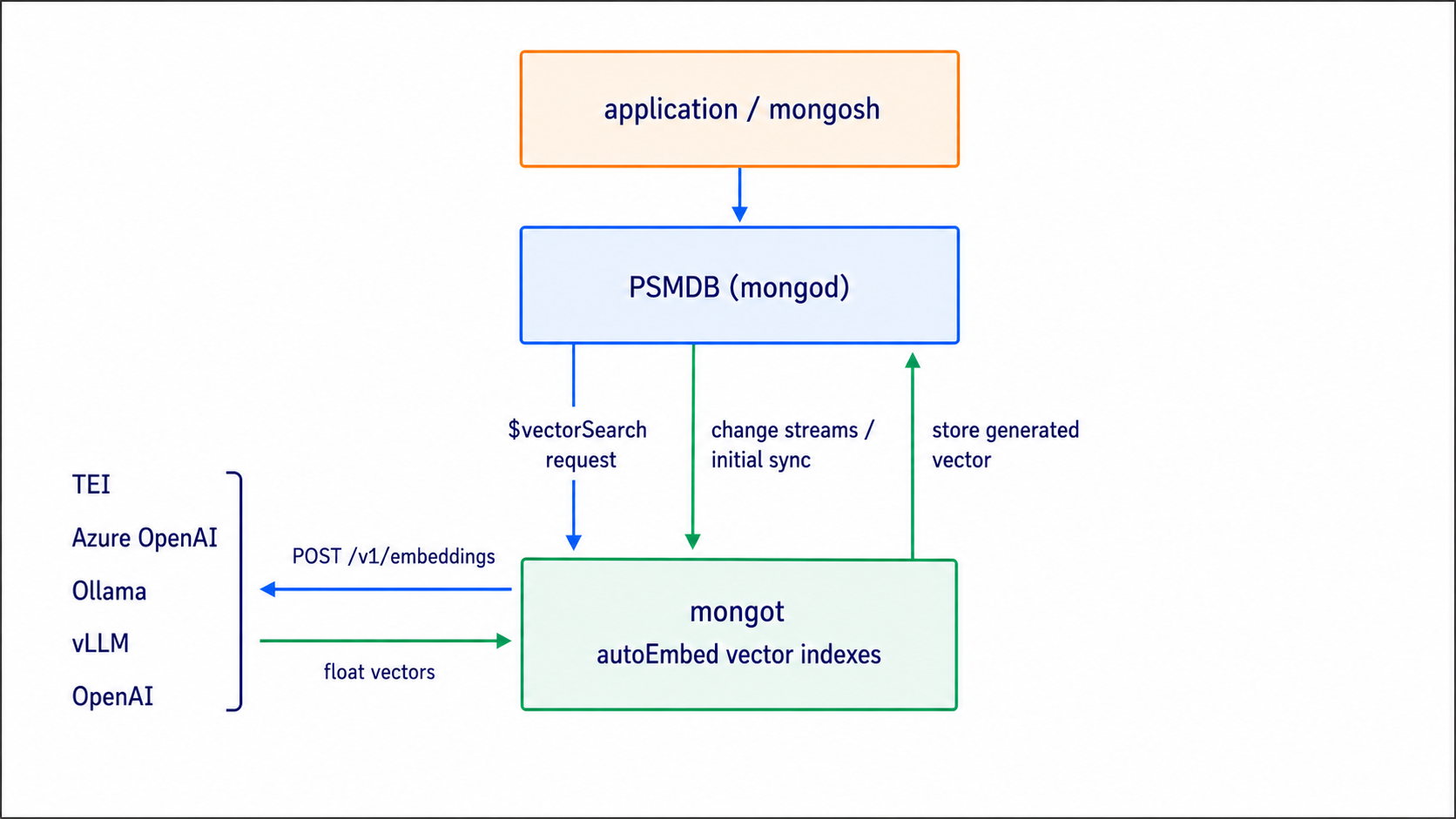
How mongot selects a provider
You don’t select a provider globally. mongot resolves it from the model name in the index definition:
- The index definition names a model, for example
{ type: "autoEmbed", model: "nomic-embed-text", ... }. mongotfinds the catalog entry whosemodelNamematches.- The entry’s
embeddingProviderfield decides which client sends the requests. Everything else that the client needs, including the endpoint, credentials, prefixes, and batching, comes from the same entry.
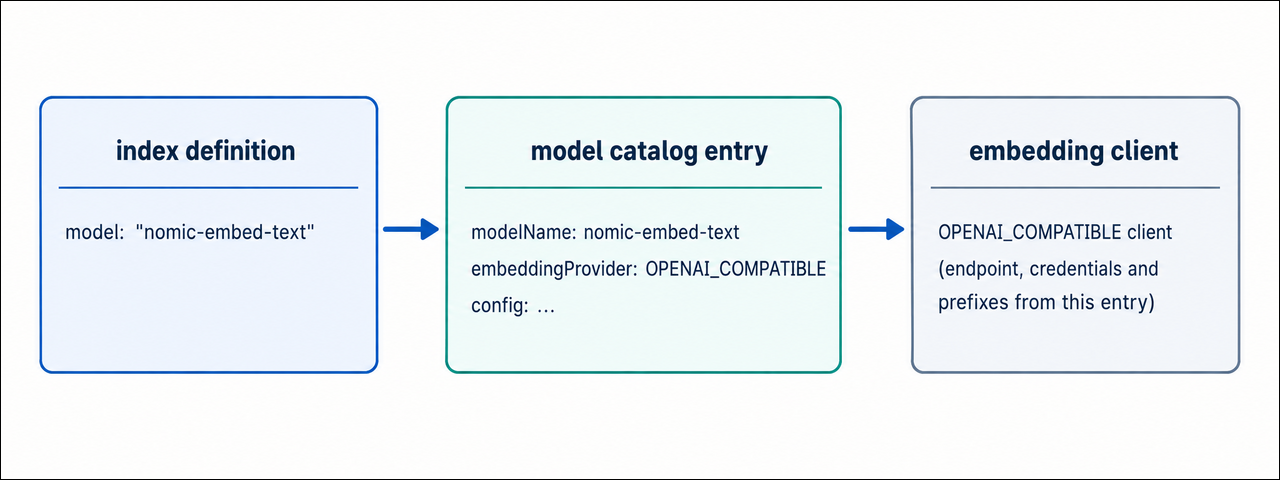
When mongot starts, it skips any model whose credentials are missing, for example Voyage models without key files, and logs a warning. The remaining models still load.
Procedure
To configure automatic embedding, do the following:
-
Make sure that the embedding service is reachable.
Percona Server for MongoDB and Percona Search for MongoDB must be configured and running, and the
mongothost must be able to reach the embedding service. Send a test request from themongothost before you configuremongot. For example, for OpenAI:curl -s https://api.openai.com/v1/embeddings \ -H "Content-Type: application/json" \ -H "Authorization: Bearer <your-openai-api-key>" \ -d '{ "model": "text-embedding-3-small", "input": ["hello"] }'A successful response contains an embedding vector. This confirms that the model is available and that your credentials work. Each setup guide shows the test request for its service.
-
Enable automatic embedding in
mongot.Add an
embeddingsection to the activemongotconfiguration file. For the documented systemd installation, edit/etc/mongot/config.yml. The presence of this section activates automatic embedding:embedding: isAutoEmbeddingViewWriter: trueImportant
Set
isAutoEmbeddingViewWriter: trueon exactly onemongotnode. That node writes the embedding materialized view. If severalmongotinstances serve the same data, configure only one of them as the writer. -
Configure the model in the catalog.
Add an entry for your model to
embedding-service-configs.yml. To keep the default catalog unchanged, create a copy and set its path withembedding.modelConfigFile.configs: - modelName: text-embedding-3-small embeddingProvider: OPENAI_COMPATIBLE config: providerEndpoint: https://api.openai.com/v1/embeddings modelConfig: batchSize: 96 batchTokenLimit: 120000 outputDimensions: 1536 quantization: float # text-embedding-3 models support Matryoshka dimension reduction forwardDimensions: true errorHandlingConfig: maxRetries: 10 initialRetryWaitMs: 200 maxRetryWaitMs: 10000 jitter: 0.1 credentials: apiKey: "<your-openai-api-key>"configs: - modelName: text-embedding-3-small embeddingProvider: OPENAI_COMPATIBLE config: providerEndpoint: https://<resource>.openai.azure.com/openai/deployments/<deployment>/embeddings?api-version=2024-02-01 modelConfig: batchSize: 96 batchTokenLimit: 120000 outputDimensions: 1536 quantization: float forwardDimensions: true errorHandlingConfig: maxRetries: 10 initialRetryWaitMs: 200 maxRetryWaitMs: 10000 jitter: 0.1 credentials: apiKey: "<your-azure-openai-api-key>" authHeaderName: api-keyFor details, see Configure automatic embedding with Azure OpenAI.
configs:
  - modelName: nomic-embed-text
    embeddingProvider: OPENAI_COMPATIBLE
    config:
      providerEndpoint: http://localhost:11434/v1/embeddings

      modelConfig:
        batchSize: 96
        batchTokenLimit: 120000
        outputDimensions: 768
        quantization: float
        # asymmetric model: queries and documents use different prefixes
        queryPrefix: "search_query: "
        documentPrefix: "search_document: "

      errorHandlingConfig:
        maxRetries: 10
        initialRetryWaitMs: 200
        maxRetryWaitMs: 10000
        jitter: 0.1

      credentials: {}
The default catalog already contains this entry and a
bge-m3entry. For details, see Configure automatic embedding with Ollama.configs: - modelName: bge-small-en-v1.5 embeddingProvider: HUGGINGFACE_INFERENCE config: modelConfig: # exact, case-sensitive Hugging Face Hub repository ID modelId: BAAI/bge-small-en-v1.5 batchSize: 32 batchTokenLimit: 120000 outputDimensions: 384 quantization: float errorHandlingConfig: maxRetries: 10 initialRetryWaitMs: 500 maxRetryWaitMs: 30000 jitter: 0.1 credentials: apiToken: "<your-hugging-face-access-token>"For details, see Configure automatic embedding with the Hugging Face Inference API.
The default catalog already contains the Voyage AI models, so you don’t need to add a catalog entry. Instead, set the API key files in the
embeddingsection ofmongot.conf:embedding: isAutoEmbeddingViewWriter: true queryKeyFile: /etc/mongot/voyage-api-query-key indexingKeyFile: /etc/mongot/voyage-api-indexing-keyConfigure both files. If they aren’t set,
mongotskips the Voyage models at startup.Restart
mongotafter you change the catalog.Important
A catalog entry that contains an API key or token holds a secret. Restrict the file so that only the account running
mongotcan read it, and keep it out of version control. -
Check the authentication settings.
mongotredacts API keys and tokens from its logs and error messages. Each provider sends credentials as follows:OPENAI_COMPATIBLE: WhenauthHeaderNameisn’t set,mongotsendscredentials.apiKeyin the standardAuthorizationheader with the Bearer scheme, which is what OpenAI expects. SetauthHeaderName: api-keyfor Azure OpenAI. Usecredentials: {}for local engines that don’t require a key.HUGGINGFACE_INFERENCE:mongotsendscredentials.apiTokenasAuthorization: Bearer <token>.VOYAGE:mongotreads the keys fromqueryKeyFileandindexingKeyFile.
-
Set the vector dimension.
Set
outputDimensionsto the size of the vectors that the model returns.mongotuses this value to size the index, so you don’t need to setnumDimensionsin the index definition.Some models, such as the OpenAI and Azure OpenAI
text-embedding-3models, can return vectors shorter than their native size. For these models, setforwardDimensions: true, andmongotsends the index dimension in the OpenAIdimensionsrequest field. Shorter vectors use less storage and memory, at some cost to accuracy.Important
Use
forwardDimensionsonly withOPENAI_COMPATIBLEmodels that support thedimensionsparameter. Most local engines return a fixed dimension and may reject the field; for these models, leaveforwardDimensionsunset.HUGGINGFACE_INFERENCEmodels don’t use this setting. They always return the model’s native dimension, so make sureoutputDimensionsmatches it. -
Start
mongotand check the startup output:systemctl start mongotConfirm that your model appears in the loaded model count. Warnings about skipped Voyage models are expected if you haven’t configured Voyage credentials.
For a description of every setting, see the Automatic embedding configuration reference. If a model doesn’t load or embedding fails, see Troubleshoot automatic embedding.