Automatic embedding with OpenAI-Compatible Providers
Percona Search for MongoDB supports automatic embedding with Voyage AI and OpenAI-compatible embedding providers. With the OPENAI_COMPATIBLE provider, mongot can generate embeddings using services that expose an OpenAI-compatible /v1/embeddings endpoint.
OpenAI-compatible embedding providers
Note
The following table lists common examples. The ports are typical defaults. Check the configuration of your embedding server before using them.
| Engine | Default endpoint | Authentication |
|---|---|---|
| Ollama | http://localhost:11434/v1/embeddings |
Not required by default |
| vLLM | http://localhost:8000/v1/embeddings |
Not required by default |
| llama.cpp server | http://localhost:8080/v1/embeddings |
Not required by default |
| LM Studio | http://localhost:1234/v1/embeddings |
Not required by default |
| LocalAI | http://localhost:8080/v1/embeddings |
Not required by default |
| Hugging Face Text Embeddings Inference (TEI) | http://localhost:8080/v1/embeddings |
Not required by default |
| OpenAI | https://api.openai.com/v1/embeddings |
Authorization: Bearer <key> |
| Azure OpenAI | Deployment-specific endpoint | api-key: <key> |
What to know before you start
Automatic embedding uses two configuration files. The embedding section in mongot.conf defines settings shared across all models. The model catalog, embedding-service-configs.yml, defines each embedding model and contains most model-specific settings.
Before configuring automatic embedding, review these settings and provider requirements:
| Setting | Supported values and requirements |
|---|---|
| Vector output format | Only float vector output is currently supported. Scalar and binary output formats aren’t supported. |
numDimensions |
Supported values are 256, 512, 1024, and 2048. |
outputDimensions |
Must match the dimensions returned by the model, unless you set forwardDimensions: true. |
OpenAI dimensions field |
Local engines commonly return vectors with a fixed dimension and may reject requests that include the OpenAI dimensions field. |
embedding.providerEndpoint |
The global override applies to VOYAGE models only. Each OPENAI_COMPATIBLE model defines its own providerEndpoint in the catalog. |
| API key | Local engines can run without an API key when authentication isn’t configured. |
For details about these settings and their defaults, see the Automatic embedding configuration reference.
How automatic embedding works
Overview
With manual embedding, your application is responsible for generating embeddings before storing or querying data. However, automatic embedding moves this work to mongot.
When you create a vector search index with an autoEmbed field, mongot embeds the indexed text during the initial collection scan and then keeps embedding it as documents change, using change streams. At query time, the text you pass to $vectorSearch goes through the same model, with the model’s query prefix applied if one is configured, and is matched against the stored vectors.
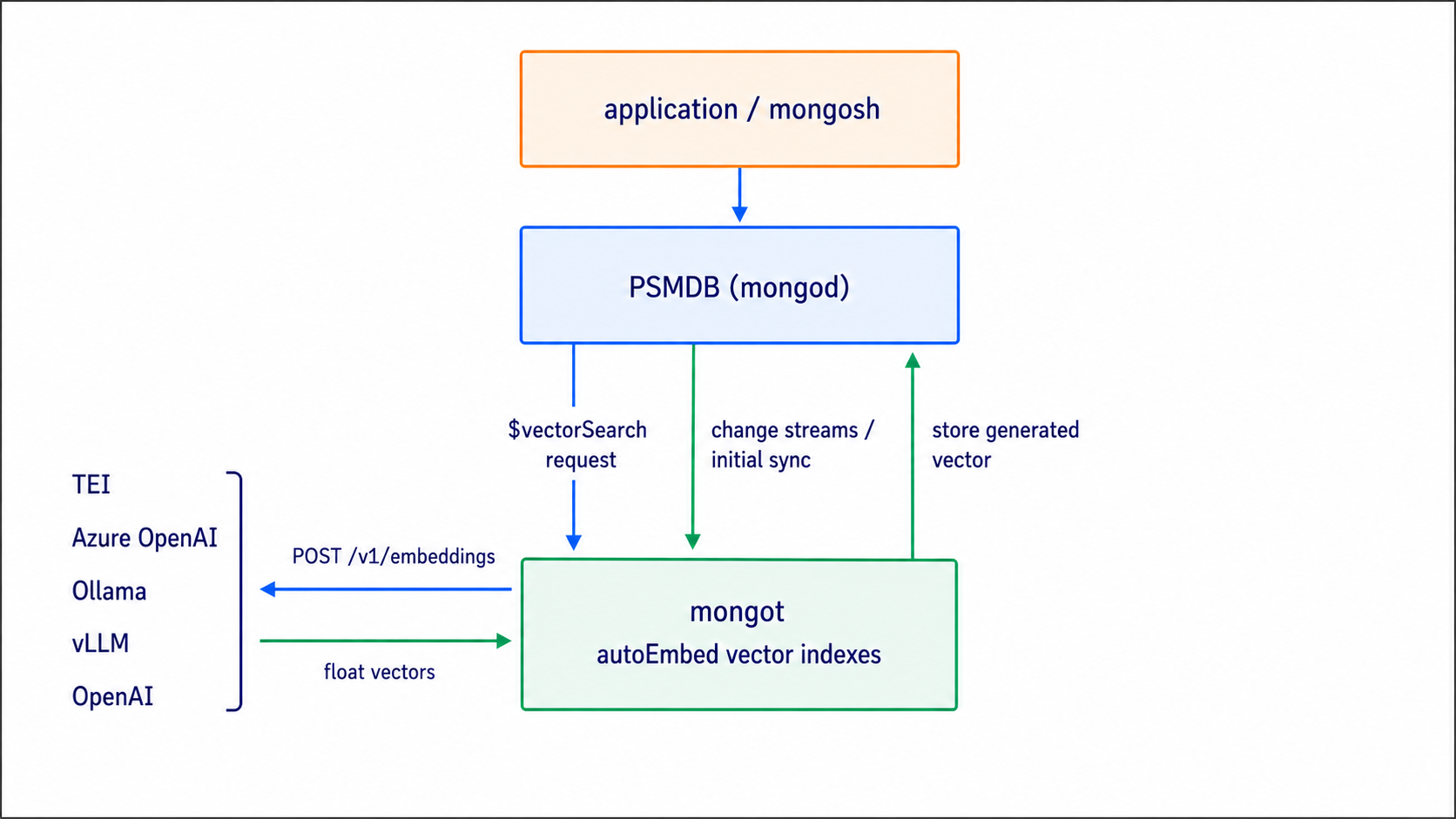
How mongot selects an embedding provider
The embedding provider isn’t selected globally in mongot.conf. It is configured for each model in embedding-service-configs.yml.
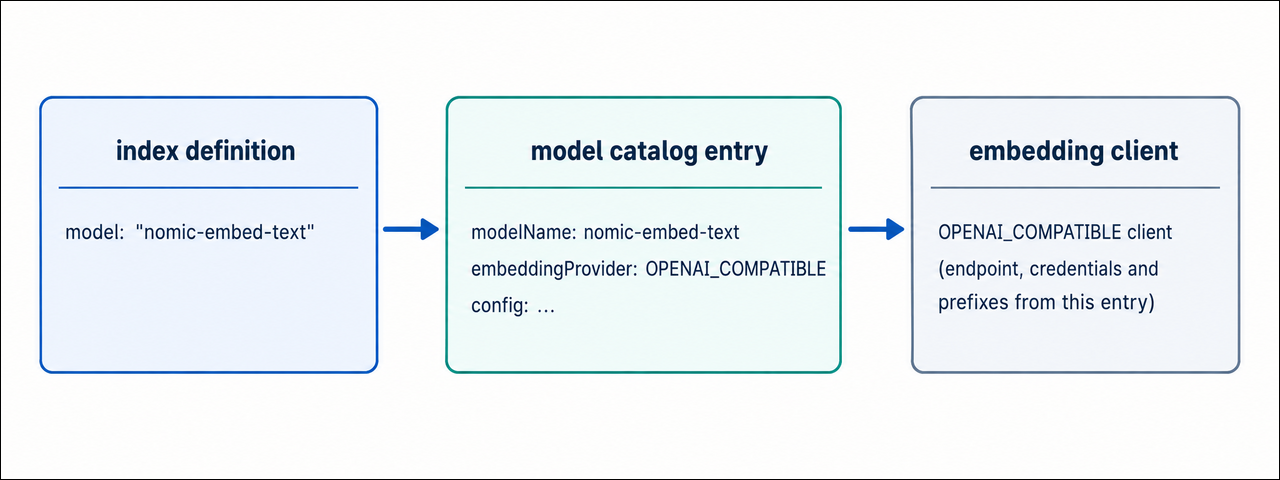
mongot resolves the embedding provider and settings from the model name:
- The index definition names a model, for example
{ type: "autoEmbed", model: "nomic-embed-text", ... }. mongotfinds the catalog entry whosemodelNamematches.- The entry’s
embeddingProviderfield, eitherVOYAGEorOPENAI_COMPATIBLE, decides which client handles the traffic. Everything else the client needs, includingproviderEndpoint, credentials, prefixes, and batching, comes from the same entry.
Note
Both provider types can be configured on the same mongot instance. When you create an autoEmbed index, the model name determines which provider and model configuration mongot uses. The embedding section in mongot.conf contains settings shared across the automatic embedding setup, such as the model catalog path and Voyage-specific configuration.
Next steps
Choose the engine you want to connect:
Configure automatic embedding with Ollama
Configure automatic embedding with OpenAI
Configure automatic embedding with Azure OpenAI