Standby cluster deployment based on streaming replication
The following diagram explains how the standby based on streaming replication works:
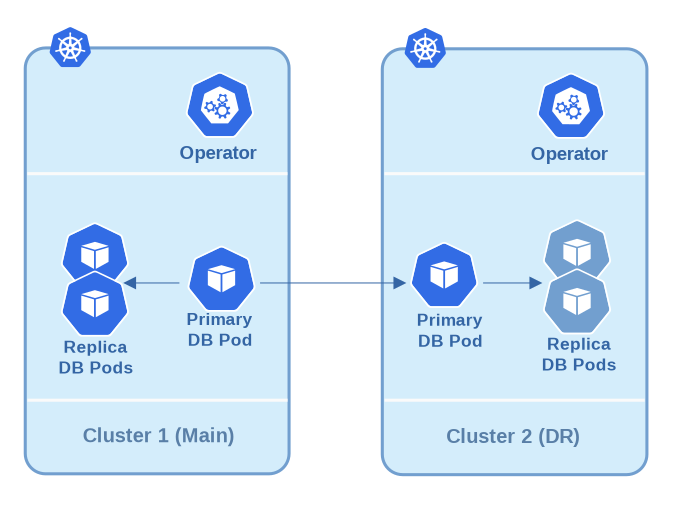
-
This solution describes two Kubernetes clusters in different regions, clouds, data centers or even two namespaces, or running in hybrid mode (on-premises and cloud). One cluster is Main site, and the other is Disaster Recovery site (DR)
-
Each site supposedly includes Percona Operator and for sure includes PostgreSQL cluster.
-
In the DR site the cluster is in Standby mode
-
We set up streaming replication between these two clusters
Deploy disaster recovery for PostgreSQL on Kubernetes
Configure Main site
-
Deploy the Operator using your favorite method.
-
The Main cluster needs to expose it, so that standby can connect to the primary PostgreSQL instance. To expose the primary PostgreSQL instance, use the
spec.exposesection:spec: ... expose: type: ClusterIPUse here a Service type of your choice. For example,
ClusterIPis sufficient for two clusters in different Kubernetes namespaces. -
Once configured, apply the custom resource:
kubectl apply -f deploy/cr.yaml -n main-pgExpected output
perconapgcluster.pg.percona.com/standby createdThe service that you should use for connecting to standby is called
-ha (main-ha in my case): main-ha ClusterIP 10.118.227.214 <none> 5432/TCP 163m
Configure DR site
To get the replication working, the Standby cluster would need to authenticate with the Main one. To get there, both clusters must have certificates signed by the same certificate authority (CA). Default replication user _crunchyrepl will be used.
To ensure authentication, choose one of these options for the server certificate:
- One shared server certificate. Create one server certificate that contains the Service names of both sites, and use it on both clusters. Copy the Secrets with the certificates from the Main site to the DR namespace. Reissue the server certificate first, so that it contains the DR names, and apply it to the Main site too. This option needs the fewest certificates.
- A server certificate for each site. Create a separate server certificate for the DR site, with the names of the DR site only, and sign it with the same CA that signed the certificates of the Main site. The Main site keeps its server certificate.
Follow these rules when you generate the certificates:
- Certificates for both Main and Standby clusters must be signed by the same CA. The replication user needs this to authenticate with the Main site, and the same CA lets each site trust the other after a role swap.
customReplicationTLSSecretmust have a Common Name (CN) setting that matches_crunchyrepl, which is a default replication user.- The server certificate of each site must contain the names of its own
<cluster>-primaryand<cluster>-replicasServices, each as<name>,<name>.<namespace>,<name>.<namespace>.svcand<name>.<namespace>.svc.cluster.local. A shared certificate contains the names of both sites. pgBouncer checks the<cluster>-primaryname of its own cluster. If the certificate has only the names of the Main site, pgBouncer on the DR site can’t connect to PostgreSQL after a promotion, and its log showsname 'dr-primary' not present in server certificate.
Create the Secrets in the namespace where the DR cluster is going to run, and reference them under spec.secrets:
spec:
  secrets:
    customTLSSecret:
      name: dr-cluster-cert
    customReplicationTLSSecret:
      name: dr-replication-cert
You can find more about certificates in the TLS doc.
Apart from setting certificates correctly, you should also set standby configuration.
  standby:
    enabled: true
    host: main-ha.main-pg.svc
    maxAcceptableLag: 10Mi  # optional: enables replication lag detection
standby.enabledcontrols if it is a standby cluster or notstandby.hostmust point to the primary node of a Main cluster. In this example it is amain-haService in another namespace.standby.maxAcceptableLag(optional) enables replication lag detection. When the WAL lag exceeds this value, the standby primary pod is marked as unready, the cluster goes intoinitializingstate, and aStandbyLaggingcondition is set in the status.
Deploy the standby cluster by applying the manifest:
kubectl apply -f dr-cr.yaml -n dr-pg
Expected output
perconapgcluster.pg.percona.com/standby created
Once both clusters are up, you can verify that replication is working.
- Insert some data into Main cluster
- Connect to the DR cluster
To connect to the DR cluster, use the credentials that you used to connect to Main. This also verifies that the connection is working. You should see whatever data you have in the Main cluster in the Disaster Recovery.
Copy the user and pgBouncer passwords
Copy the user passwords and the pgBouncer password from the Main site to the DR site, so that applications and pgBouncer can log in after you promote the DR cluster. Follow Prepare the user passwords.
Next steps
Because the certificates of both sites are signed by the same CA, you can later swap their roles. The Main site then follows the DR site without a rebuild.
Created: June 28, 2024