Standby cluster deployment based on pgBackRest
The pgBackRest repo-based standby is the simplest one. The following is the architecture diagram:
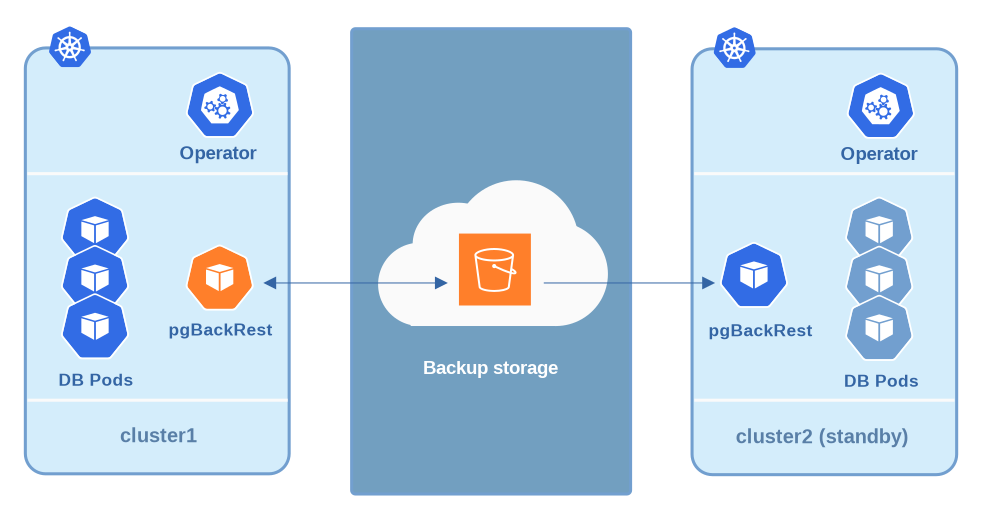
pgBackrest repo based standby
-
This solution describes two Kubernetes clusters in different regions, clouds or running in hybrid mode (on-premises and cloud). One cluster is Main and the other is Disaster Recovery (DR)
-
Each cluster includes the following components:
- Percona Operator
- PostgreSQL cluster
- pgBackrest
- pgBouncer
-
pgBackrest on the Main site streams backups and Write Ahead Logs (WALs) to the object storage
-
pgBackrest on the DR site takes these backups and streams them to the standby cluster
Deploy disaster recovery for PostgreSQL on Kubernetes
Configure Main site
-
Deploy the Operator using your favorite method. Once installed, configure the Custom Resource manifest, so that pgBackrest starts using the Object Storage of your choice. Skip this step if you already have it configured.
-
Configure the
backups.pgbackrest.repossection by adding the necessary configuration. The below example is for Google Cloud Storage (GCS):spec: backups: configuration: - secret: name: main-pgbackrest-secrets pgbackrest: repos: - name: repo1 gcs: bucket: MY-BUCKETThe
main-pgbackrest-secretsvalue contains the keys for GCS. Read more about the configuration in the backup and restore tutorial. -
Once configured, apply the custom resource:
kubectl apply -f deploy/cr.yamlExpected output
perconapgcluster.pg.percona.com/standby createdThe backups should appear in the object storage. By default pgBackrest puts them into the pgbackrest folder.
Configure DR site
The configuration of the disaster recovery site is similar to that of the Main site, with the difference in standby settings.
The following manifest has standby.enabled set to true and points to the repoName where backups are (GCS in our case). Optionally, add standby.maxAcceptableLag to enable replication lag detection. Check the known limitation for this standby type and choose the threshold accordingly.
metadata:
  name: standby
spec:
...
  backups:
    configuration:
      - secret:
          name: standby-pgbackrest-secrets
    pgbackrest:
      repos:
      - name: repo1
        gcs:
          bucket: MY-BUCKET
  standby:
    enabled: true
    repoName: repo1
    # maxAcceptableLag: 64Mi  # optional: enables replication lag detection
Deploy the standby cluster by applying the manifest:
kubectl apply -f deploy/cr.yaml
Expected output
perconapgcluster.pg.percona.com/standby created
Copy the user and pgBouncer passwords
After you deploy the standby, copy the user passwords and the pgBouncer password from the Main site to the DR site, so that applications and pgBouncer can log in after you promote the DR cluster. Follow Prepare the user passwords.
Created: June 28, 2024