Google Cloud Storage
To use Google Cloud Storage (GCS) for backups, configure a pgBackRest repository in backups.pgbackrest.repos and provide:
- A GCS bucket name which you will reference in the
gcs.bucketoption under the repository entry - A Google service account key, which the Operator will use to access the storage.
Configuration steps
The following example configuration uses the repo3 repository name.
-
Create a service account key following the Google Cloud instructions .
-
Download the key from the Google Cloud console (IAM & Admin → Service Accounts → your account → KEYS → ADD KEY → Create new key → JSON). The downloaded file is typically named
gcs-key.json.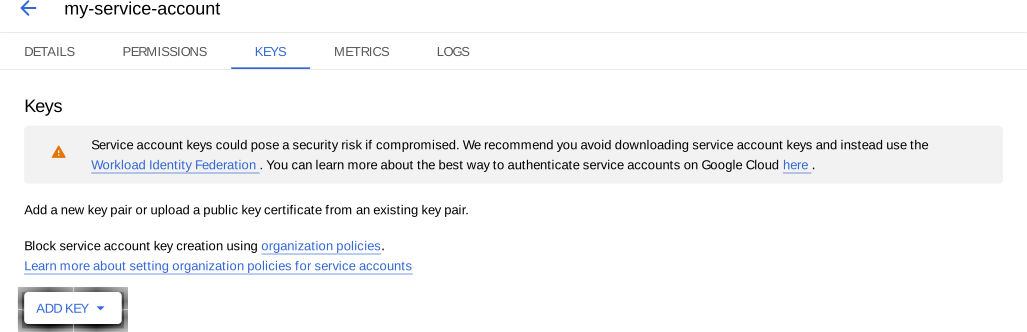
-
Prepare the Secret data:
-
Create
gcs.conffor repositoryrepo3:[global] repo3-gcs-key=/etc/pgbackrest/conf.d/gcs-key.json -
Encode both
gcs-key.jsonandgcs.conffiles using base64:base64 --wrap=0 <filename>base64 -i <filename> -
Create the Secret manifest. For example,
cluster1-pgbackrest-secrets.yaml:apiVersion: v1 kind: Secret metadata: name: cluster1-pgbackrest-secrets type: Opaque data: gcs-key.json: <base64-encoded-json-file-contents> gcs.conf: <base64-encoded-conf-file-contents>You can store credentials for several repositories in one Secret by adding separate data keys.
-
-
Apply the Secret. Replace
<namespace>with your namespace:kubectl apply -f cluster1-pgbackrest-secrets.yaml -n <namespace> -
Update
deploy/cr.yamlCustom Resource manifest:- Reference the Secret in
backups.pgbackrest.configuration - Provide the backup path in backups.pgbackrest.global with the pgBackRest
pathoption. The repository name must match the name ingcs.conf(repo3-pathin this example) - Define the GCS bucket under
repos.
... backups: pgbackrest: ... configuration: - secret: name: cluster1-pgbackrest-secrets ... global: repo3-path: /pgbackrest/postgres-operator/cluster1/repo3 ... repos: - name: repo3 gcs: bucket: "<YOUR_GCS_BUCKET_NAME>" - Reference the Secret in
-
Apply the cluster Custom Resource. Replace the
<namespace>placeholder with your value:kubectl apply -f deploy/cr.yaml -n <namespace>
Next steps
Make an on-demand backup Make a scheduled backup
Created: May 22, 2026