How Percona ClusterSync for MongoDB works
Percona ClusterSync for MongoDB is a binary process that replicates data between MongoDB deployments in real time until you manually finalize it. You can also make a one-time data migration from the source to the target with near-zero downtime.
You operate with Percona ClusterSync for MongoDB using the set of commands or API calls. Depending on the request it receives, Percona ClusterSync for MongoDB has several states as shown in the following diagram:
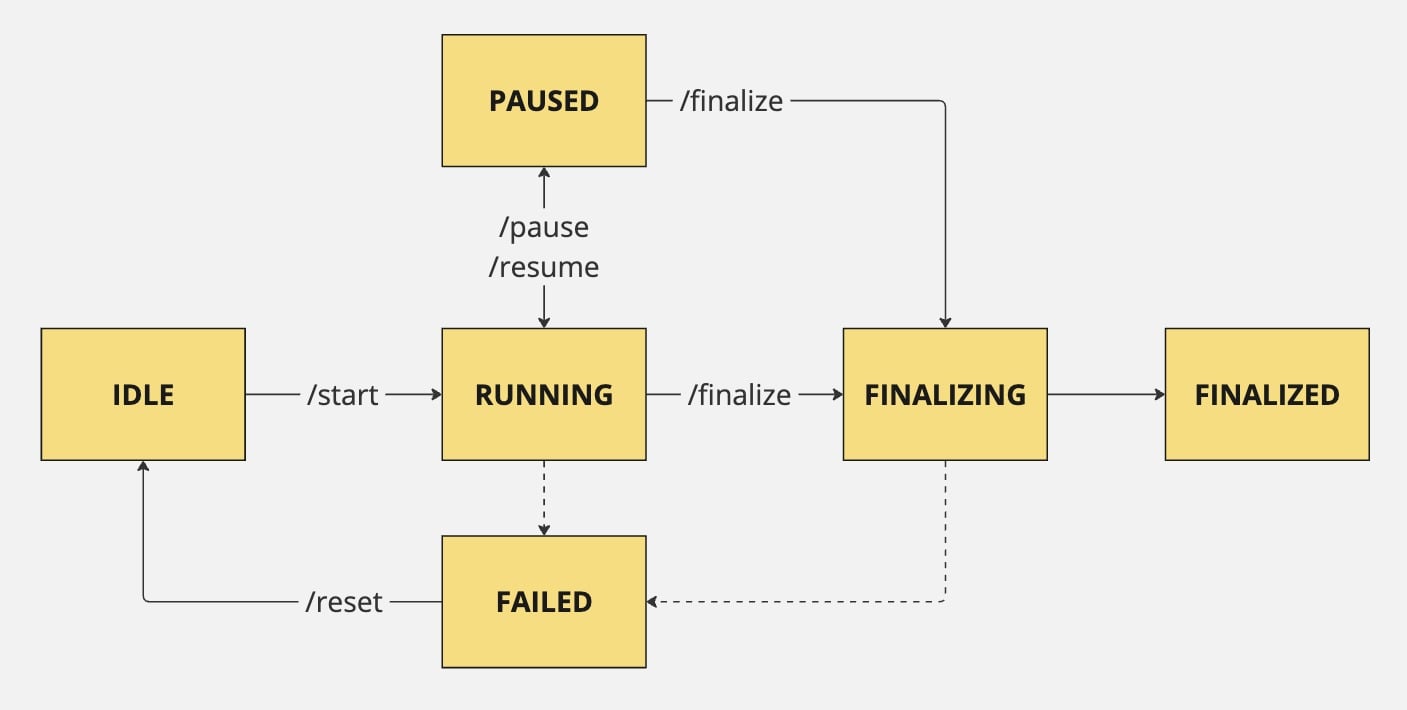
- Idle: PCSM is up and running but not migrating data
- Running: PCSM is replicating data from the source to the target. PCSM enters the running state when you start and resume the replication
- Paused: PCSM is not running and data is not replicated
- Finalizing: PCSM stops the replication and is doing final checks, creates indexes
- Finalized: all checks are complete, data replication is stopped
- Failed: PCSM encountered an error
Transaction handling
Overview
PCSM follows a per-document ordered replication model.
For a given document, operations such as insert, update, and delete are applied to the target in the same order as they occur on the source. This ensures consistency at the individual document level across clusters.
Multi-document transactions
When handling multi-document transactions, PCSM applies operations with the following behavior:
- Operations from a multi-document transaction are replicated as individual document-level operations rather than a single atomic unit, similar to how change streams emit events for each operation within a transaction.
- Per-document ordering is preserved: operations on the same document are applied in source order.
- Cross-document transaction atomicity is not guaranteed on the target. During replication, the target may temporarily reflect a partial state of a transaction.
Note
This behavior applies to all versions of PCSM.
Replication workflows
The workflow for PCSM depends on your MongoDB deployment topology. Select the tab below that matches your setup:
Usage scenario
Let’s use a data migration from MongoDB Atlas to Percona Server for MongoDB as an example to understand how PCSM works with replica sets.
You run a MongoDB Atlas 8.0 deployed as a replica set. You need to migrate to the latest 8.0 release of Percona Server for MongoDB, which also supports replica sets. You have a strict requirement to migrate with near-zero downtime; therefore, using logical backups with Percona Backup for MongoDB is not an option.
A solution is to use Percona ClusterSync for MongoDB. MongoDB Atlas is your source and a Percona Server for MongoDB replica set is your target. During startup, PCSM prepares the target by dropping and recreating the selected collections, which overwrites any existing data in them. Because this process can generate substantial network traffic and put additional load on the source and target, run PCSM on a dedicated host located as close to the target as possible to minimize latency.
Workflow steps
The following is the workflow for PCSM:
-
Set up authentication: Create users for PCSM in both MongoDB deployments. Configure MongoDB connection string URIs for your source and target that list all replica set members, then start PCSM using these user credentials. See Configure authentication in MongoDB for details.
-
Start the replication
Important
During the replication startup phase:
- Only the collections selected for replication are dropped and recreated.
- Existing databases and collections on the target that are not selected for replication remain untouched.
Call the
startcommand. PCSM prepares the target collections and begins the replication process. For each selected collection, PCSM performs the following actions:-
Drop collection on target
If the target collection already exists, PCSM drops it to ensure a clean state for incoming data.
-
Recreate collection
The collection is recreated on the target with the same options as the source (such as capped settings, collation, validators, and other collection-level options).
-
Create indexes
Indexes are created on the target based on those defined on the source collection. For details (for example, unique index handling), see Index handling.
-
Initial sync
PCSM copies the documents from the source collection to the target.
See Start the replication for command details.
-
Real-time replication: After the initial data sync, PCSM monitors changes in the source and replicates them to the target at runtime. You don’t have to stop your source deployment—it operates as usual, accepting client requests. PCSM uses change streams to track the changes to your data and replicate them to the target.
-
Control replication: You can
pausethe replication andresumeit later. When paused, PCSM saves the timestamp when it stops the replication. After you resume PCSM, it starts watching for the changes from the moment when the replication was paused and continues real-time replication. See Pause the replication and Resume the replication for command details. -
Monitor progress: Track the migration status in logs and using the
statuscommand. See Check the replication status for details. -
Finalize: When the data migration is complete, call the
finalizecommand. This makes PCSM finalize the replication, create the required indexes on the target, and stop. Note that finalizing is a one-time operation. If you try to start PCSM again, it will start data copy anew. See Finalize the replication for command details. -
Cutover: Switch your clients to connect to Percona Server for MongoDB.
For detailed instructions, see Use Percona ClusterSync for MongoDB.
Usage scenario
Let’s use a data migration between two sharded MongoDB clusters as an example to understand how PCSM works with sharded clusters.
For example, you run a MongoDB Enterprise Advanced 8.0 sharded cluster with 3 shards as your source. You need to migrate to a self-hosted Percona Server for MongoDB 8.0 sharded cluster with 5 shards as your target. You need zero-downtime migration and cannot afford to disable the balancer on either cluster, which makes traditional migration methods challenging.
A solution is to use Percona ClusterSync for MongoDB. Since PCSM connects to mongos instances, the number of shards on source and target can differ. Install PCSM on a dedicated host closer to the target cluster to minimize network latency.
Workflow steps
The following is the workflow for PCSM for sharded clusters:
-
Set up authentication: Create users for PCSM in both MongoDB deployments. Configure connection strings using
mongoshostname and port for both source and target clusters. See Configure authentication in MongoDB for details. -
Shard key setup during
start(if applicable)When you run
start, if the source collection is sharded, PCSM creates the corresponding sharded collection on the target using the same shard key; the target cluster manages other sharding details internally. -
Start the replication
Important
During the replication startup phase:
- Only the collections selected for replication are dropped and recreated.
- Existing databases and collections on the target that are not selected for replication remain untouched.
Call the
startcommand. You don’t have to disable the balancer on the target. During startup, PCSM ensures that sharded collections selected for replication exist on the target with the same shard key as the source, then it starts copying all data from the source to the target. First it does the initial sync by cloning the data and then applying all the changes that happened since the clone start. See Start the replication for command details. -
Real-time replication: During the replication stage, PCSM captures change stream events from the source cluster through
mongosand applies them to the target cluster, ensuring real-time synchronization of data changes. The target cluster’s balancer handles chunk distribution. For details about sharding-specific behavior, see Sharding behavior. -
Control replication: You can
pausethe replication andresumeit later, just like with replica sets. When paused, PCSM saves the timestamp when it stops the replication. See Pause the replication and Resume the replication for command details. -
Monitor progress: Track the migration status in logs and using the
statuscommand. See Check the replication status for details. -
Finalize: When the data migration is complete and you no longer need to run clusters in sync, call the
finalizecommand to complete the migration. This makes PCSM finalize the replication, create the required indexes on the target, and stop. Note that finalizing is a one-time operation. If you try to start PCSM again, it will start data copy anew. See Finalize the replication for command details. -
Cutover: Switch your clients to connect to the target Percona Server for MongoDB cluster.
For detailed information about sharded cluster replication, see Sharding support in Percona ClusterSync for MongoDB.
Filtered replication
You can replicate the whole data set or only a specific subset of data, which is a filtered replication. You can use filtered replication for various use cases, such as:
-
Spin up a new development environment with a specific subset of data instead of the whole data set.
-
Optimize cloud storage costs for hybrid environments where your target MongoDB deployment runs in the cloud.
Specify what namespaces—databases and collections—to include and/or exclude from the replication when you start it. See Start the filtered replication for details.
Index handling
PCSM manages indexes throughout the replication process to ensure data consistency and query performance on the target cluster.
Replication stage
During the replication stage, PCSM copies indexes from the source to the target cluster as follows:
-
Unique indexes handling: Unique indexes are copied as non-unique indexes during replication. This allows PCSM to handle potential duplicate data that may exist during the migration process.
-
Hidden indexes: PCSM copies hidden indexes as non-hidden.
-
TTL index handling: When copying TTL indexes, PCSM temporarily disables TTL expiration and saves the
expireAfterSecondsproperty for later restoration. This way PCSM ensures documents won’t expire while being copied. -
Index creation during sync: If an index is created on the source cluster while the clusters are in sync, PCSM automatically creates the same index on the target cluster.
-
Incomplete indexes: If the index build is in progress during the replication stage, PCSM records that and will try to recreate the index during the finalization stage.
-
Inconsistent indexes: PCSM uses the $indexStats aggregation to count index occurrences across shards. If an index exists on fewer shards than the id index, it is considered inconsistent. PCSM skips cloning inconsistent indexes during the replication stage.
-
Failed index creation: If PCSM cannot create an index during replication, it proceeds with replication and records the failure. The index creation will be retried during the finalization stage.
Finalization stage
On the finalization stage, PCSM finalizes index management on the target cluster to match their configuration on the source:
-
Unique index conversion: Non-unique indexes that were originally unique on the source are converted back to unique indexes.
-
Hidden indexes: PCSM marks target indexes as hidden when the corresponding source indexes use the hidden option.
-
TTL indexes: PCSM restores the original
expireAfterSecondsvalue for TTL indexes on the target cluster so that documents will expire according to the original configuration. -
Inconsistent indexes: PCSM checks the source again for indexes that were inconsistent during the replication stage. If the source checks confirm that the index still exists, is no longer being built, and is no longer inconsistent across shards, PCSM attempts to create it on the target using its current source definition. If the checks or recreation fail, PCSM logs a warning and lists the index in
finalization.unsuccessfulIndexesin the status response. Check the logs and try to manually recreate such indexes on the target. -
Retry failed indexes: PCSM attempts to create indexes that failed to be created during replication.
-
Warning logs: If PCSM cannot create an index even during finalization, it records a warning in the logs. Check the logs after finalization to identify any indexes that could not be created.
This approach ensures that replication continues even if some indexes cannot be created immediately, while still attempting to create all indexes during finalization to match the source cluster’s index configuration.
Next steps
Ready to try out PCSM?
Created: October 13, 2026